
Your AI security problem is mostly an access problem
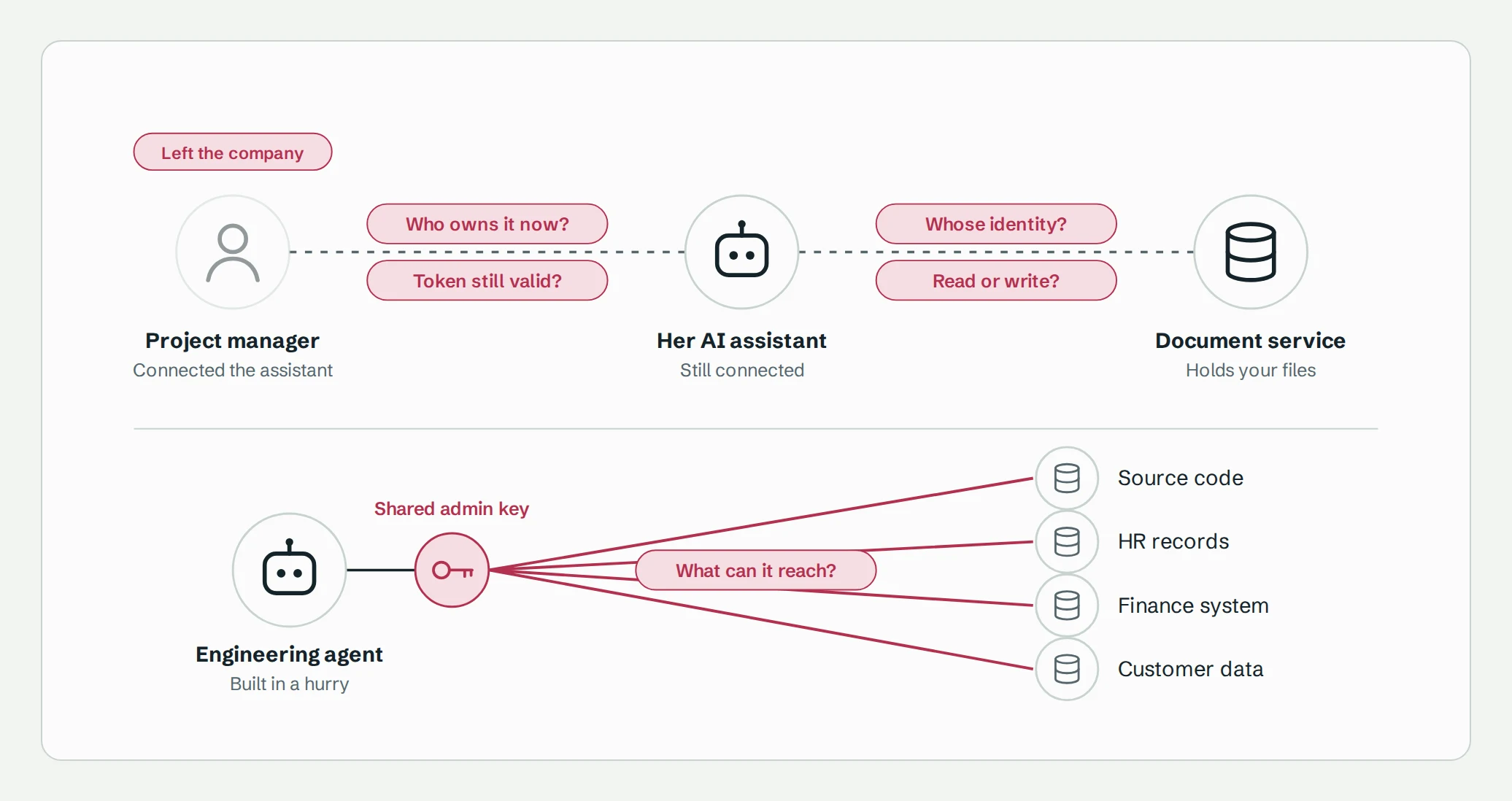
Picture a project manager who connects an AI assistant to your document service so it can summarize open issues. It works well, and soon her team is using it from their phones too. Meanwhile, a developer builds a similar agent for engineering and, to get it running quickly, gives it a shared admin credential. A few months later, the project manager leaves the company.
Now try answering a few questions. When her assistant touches your documents, whose identity does it use: hers, or the application's own? Can it write, or only read? Did disabling her account shut it off, or is a token still valid somewhere? Who owns the engineering agent, and what can that admin credential reach?
If those questions are hard to answer, no AI-specific security product will fix it. That is the central argument of this roadmap:
Most AI security questions are access questions in disguise.
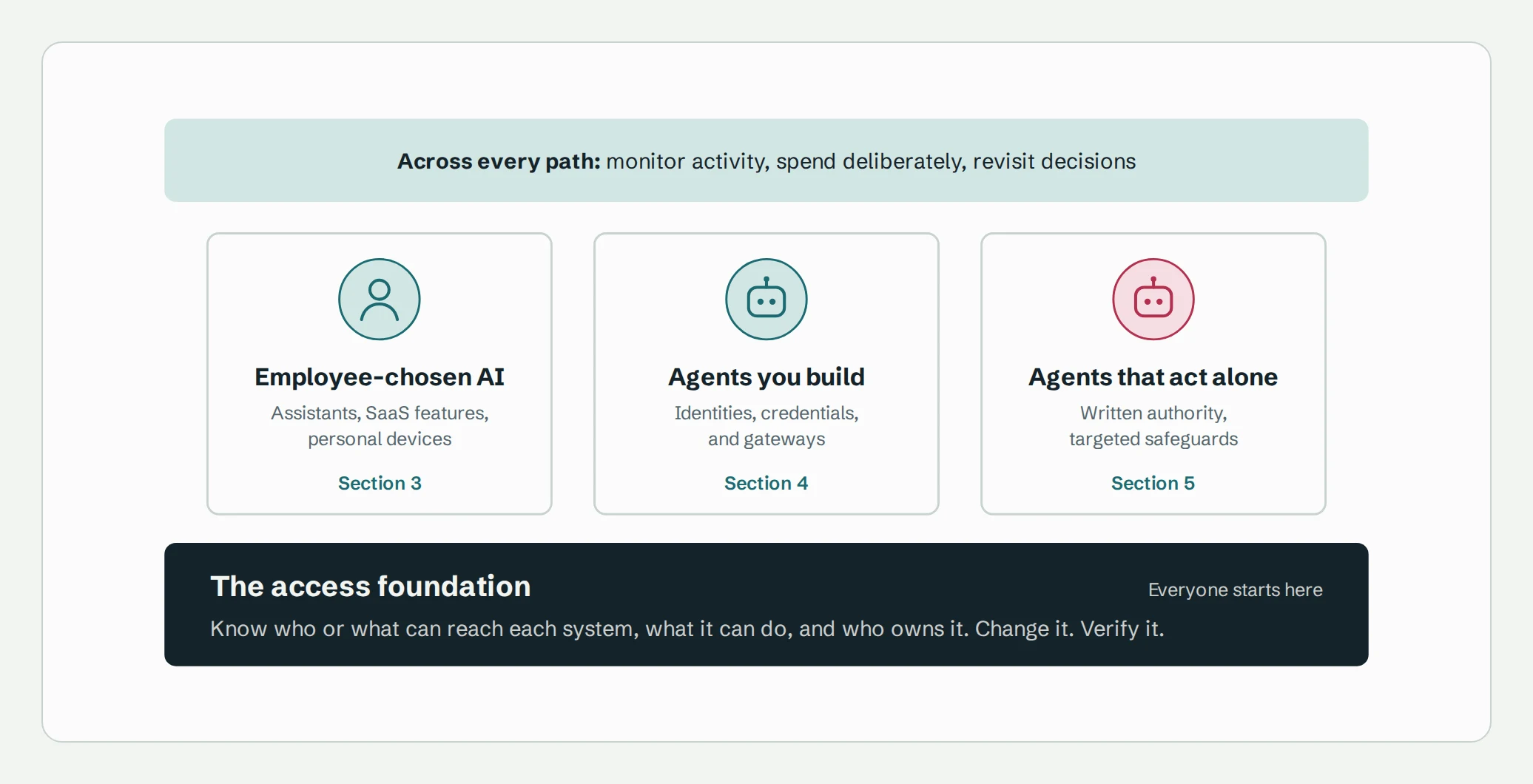
Before you evaluate prompt filters, AI firewalls, or agent platforms, make sure you can say who or what can reach your business systems, what each one can do, and how you would change or remove that access. Then add specialized controls only for the risk that's left over.
Everyone needs the foundation. After that, choose the paths that match what your organization actually does.
1. Start with the work, not the tools
It's tempting to begin with a vendor comparison. Resist it. You can't judge whether a control fits until you know what it's meant to protect.
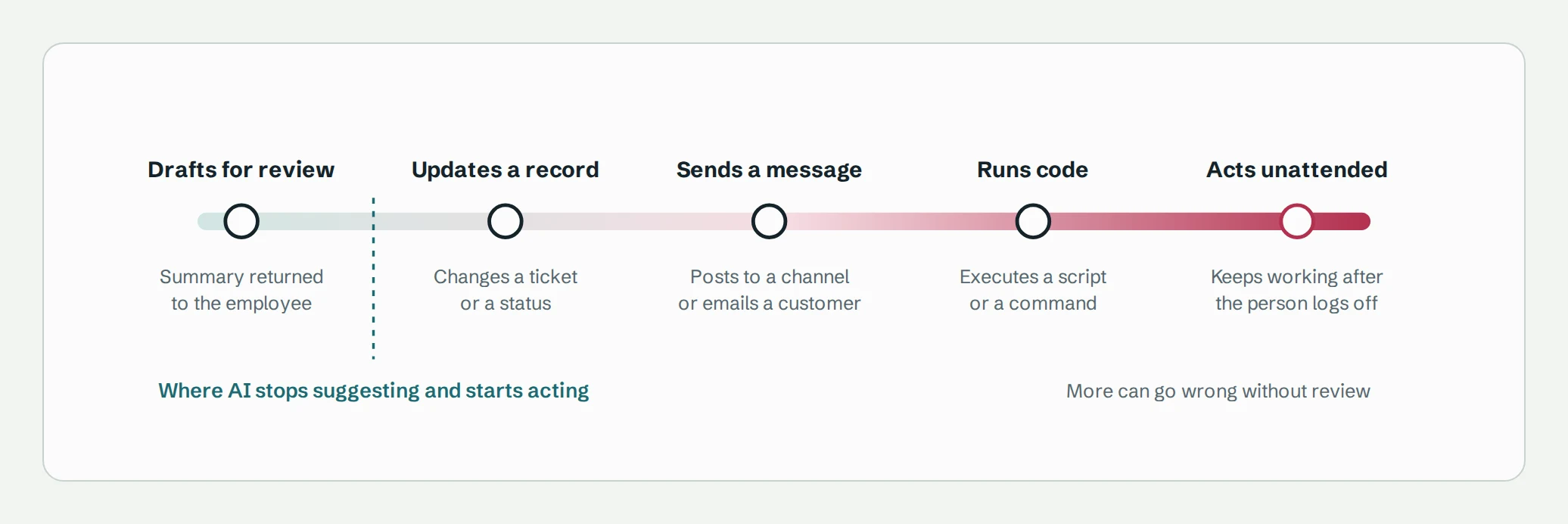
Pick a handful of representative workflows and describe each one in plain language. Capture the task, the information involved, and what the assistant actually does. That last part matters most. An assistant that drafts text for a person to review carries a very different risk from one that updates a record, sends a message, or runs code.
Note where the work happens, too. An employee may sign in with a corporate account on a personal phone. A company laptop may run an agent app the employee picked. A task started in a browser might keep running in the cloud after the tab is closed. Each of these changes which controls can even apply, and broad labels like "unmanaged AI" hide those differences.
Compare two workflow descriptions:
- Not useful: "We use AI for productivity."
- Useful: "Project managers summarize internal issues from laptops and phones. They need access to their existing projects. They review summaries as drafts. Posting an update is a separate action."
The second gives IT something to evaluate: the data, the devices, the permissions, and the exact point where the AI moves from suggesting to acting.
While you're at it, ask employees why they use the tools they do. Familiarity, mobile access, integrations, and output quality are real needs. Ban a tool without meeting them and people will route around you. The UK's National Cyber Security Centre makes the same point about shadow AI: understand what employees need, and offer suitable alternatives.
2. Build the access foundation
Everything else depends on this. You probably already own tools that cover part of it, so the job is to find the gaps before deciding what to add.
Four questions for every important integration
For each AI integration that touches something that matters, you should be able to answer:
- Who connected it, and who owns it now?
- Which identity does it use when the destination service checks permissions?
- What can it actually do, and on which resources?
- How would you change or remove that access, and how would you know it worked?
A good record reads something like this: "Alex connected this assistant to the document service. It uses this application grant and identity. It can perform these operations on these resources. The platform team owns it and can change its access."
Question 2 is where people get tripped up, because three different things are in play: the employee, the AI application, and the identity the destination service actually authorizes. They aren't always the same. Microsoft Graph illustrates this well. It separates delegated access, where an app acts on behalf of a signed-in user, from app-only access, where the app acts under its own identity and can reach any data its permission covers, across the whole organization.
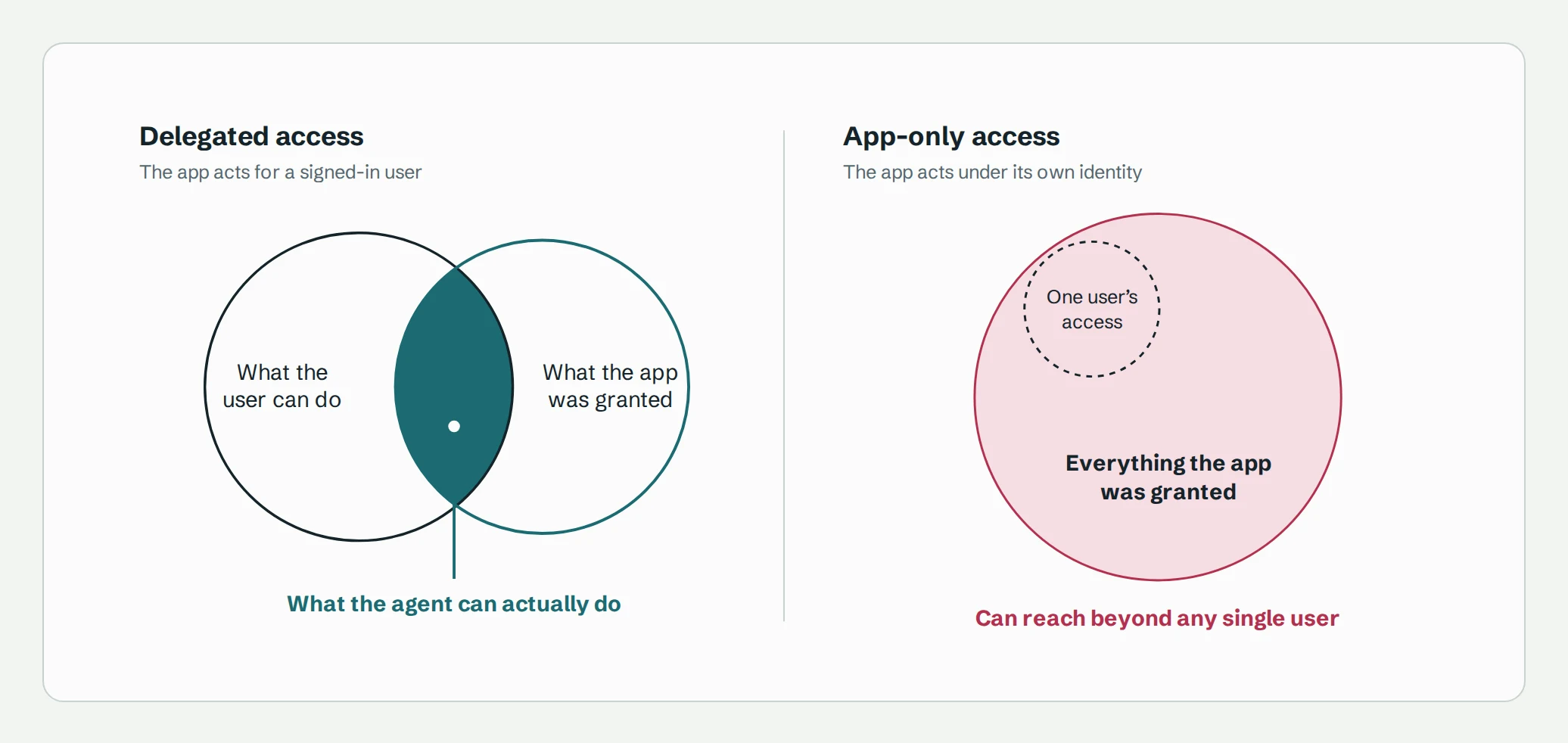
An employee signing in to an assistant with a corporate account doesn't tell you which of these its integrations use. Find out.
Be honest about how sure you are, too. A role someone configured, a permission you inferred, and a restriction you actually tested are three different levels of evidence. Label them accordingly.
Don't assume your identity tools see everything
SCIM is good at provisioning users and groups across services. It doesn't standardize what those groups are allowed to do: the specification leaves that meaning to each service and defines no universal vocabulary for roles. Meanwhile, AI integrations often work through OAuth grants, application permissions, service identities, and API keys that never show up in your provisioning flow.
Some providers expose more. Google's Directory API, for instance, lets administrators list the applications each user has authorized, see the scopes granted, and delete the tokens that user issued to a given app.
If you need a new tool to close these gaps, judge it on depth rather than connector count. Does it understand inherited access? Does it separate what a user can do from what an application can do? Does it keep resource-level detail? And does it tell you plainly what it can't see?
Manage access over its whole life
Discovering access is only the beginning. Give each grant an owner and an approved purpose, narrow permissions to fit that purpose, review new grants as they appear, and remove what's no longer justified. Then check that the removal actually worked.
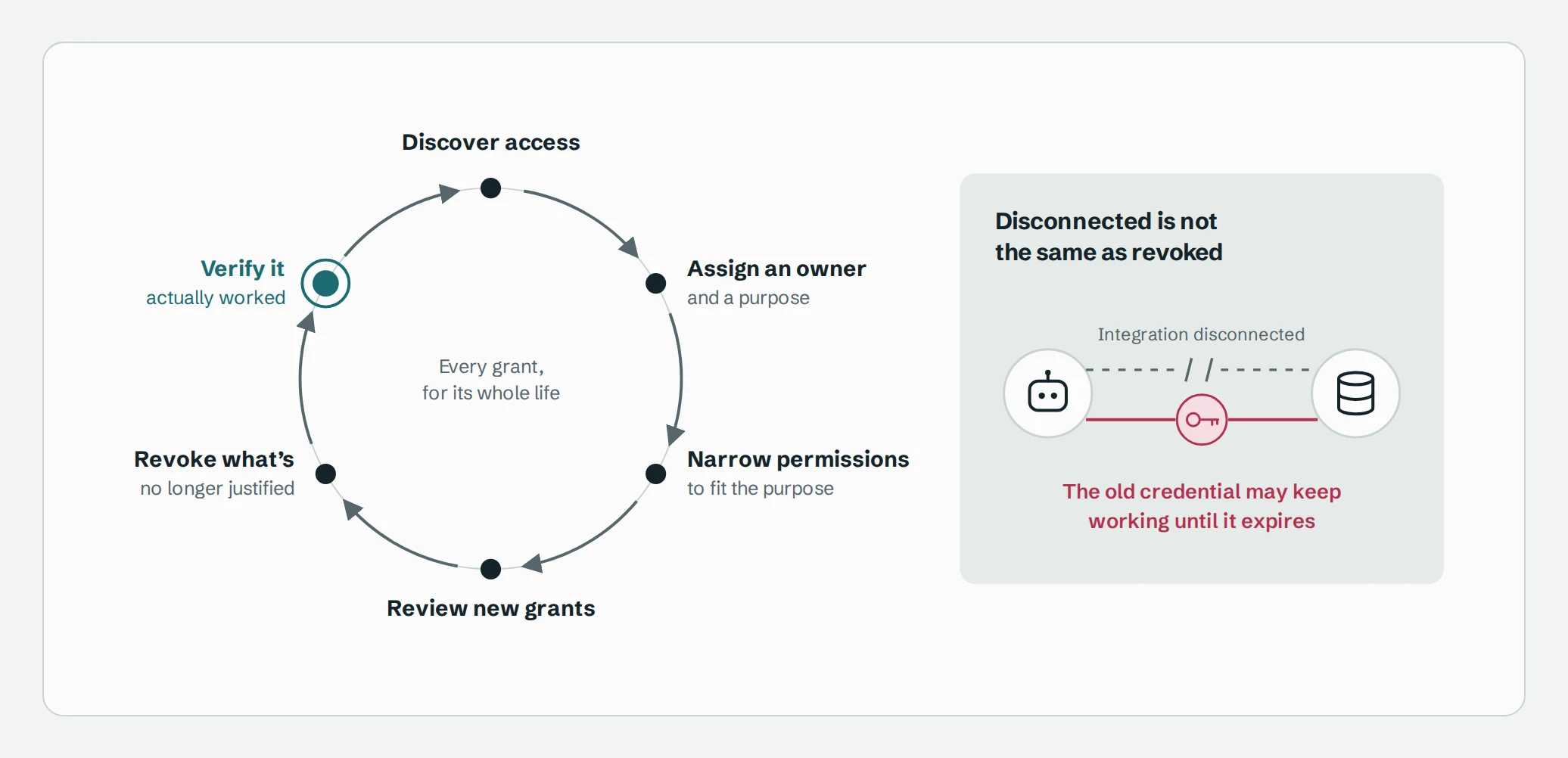
That check matters because disconnecting an integration doesn't always kill its credentials. Vercel's credential-broker documentation, for example, notes that when a provider has no revocation endpoint, revoking only removes the token from Vercel's own store, and the provider credential may keep working until it expires.
You'll find that many "AI security findings" are ordinary access problems with ordinary fixes. A reporting agent has write access it doesn't need? Remove the write access. An integration nobody owns? Assign an owner or delete it. Neither calls for a prompt-inspection product.
Start with your highest-consequence systems, and write down what you've covered and what you haven't.
The foundation test: Before buying anything, can you explain an AI tool's access, change it through a process someone owns, and verify the change took effect? If not, start here.
3. Employee-chosen AI
This path covers purchased assistants, AI features built into SaaS apps, local tools employees pick themselves, and work that moves between devices.
You don't have to standardize on a single assistant. Supporting several can work, as long as you can keep the necessary access and data restrictions in place for each one.
Let the services enforce the rules
You don't need to route every AI interaction through a proxy. Often the sturdier option is to configure restrictions inside the services themselves, so they apply no matter which assistant makes the request. SharePoint, for example, enforces external sharing settings at both the organization and site level, always applying the more restrictive of the two, and a management integration can set them in advance without inspecting a single prompt.
SaaS security posture management (SSPM) tools can help, but the label covers several distinct jobs: assessing settings, applying restrictions, collecting activity logs, and making administrative changes. Verify each job separately, for each service.
Visibility into AI providers is uneven too. OpenAI's Compliance Platform, for example, provides logs from ChatGPT Enterprise and Edu workspaces, so an employee's personal account, or anything else outside that workspace, isn't in scope. A connector can only surface what the provider exposes, so check the APIs, required subscription tiers, collection delays, and available admin actions before you depend on them.
Decide what data can go where
This distinction is easy to miss: permission to read a document is not permission to send it to any AI service.
Decide which data may go to which provider, tenant, and feature, and read the processing, retention, and deletion terms closely. "Not used for training" doesn't mean "not stored." OpenAI's API documentation, for example, says API data isn't used for training by default, yet abuse-monitoring logs, which can include prompts and responses, are kept for up to 30 days by default, and some features store application state.
Watch for copies as well. When an assistant indexes documents or keeps persistent context, revoking access to the original doesn't necessarily remove what was already copied.
Match device controls to the task
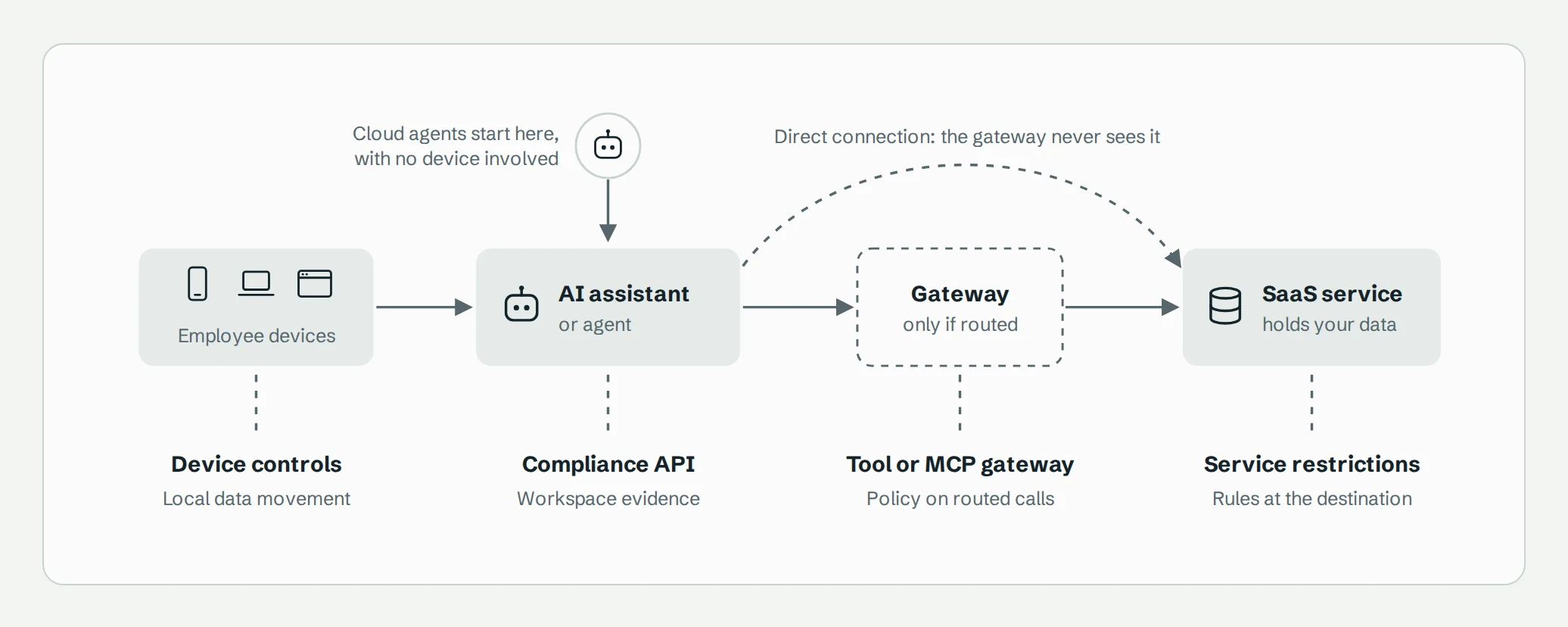
For mobile use, you can require managed devices, protect specific apps, or allow limited mobile use while requiring a more controlled environment for sensitive steps. Each option has limits. Microsoft Intune can protect apps without full device enrollment, on phones and for Microsoft Edge on personal Windows PCs, but only apps built or wrapped to support it, so it won't protect an arbitrary AI app. Endpoint DLP can catch some local data movement on Windows and macOS, such as uploading sensitive files to a web service or copying them to the clipboard, but only for the apps, browsers, and activities it supports.
Every control covers its own territory and nothing more.
Put the controls to the test
The route, account, and exact action change the answer. These illustrative scenarios compare four specific controls. Each column is assessed independently: "Can block" means a supported prevention point with an applicable policy, "Records only" means evidence after submission, and a dash means the scenario is outside that control's scope.
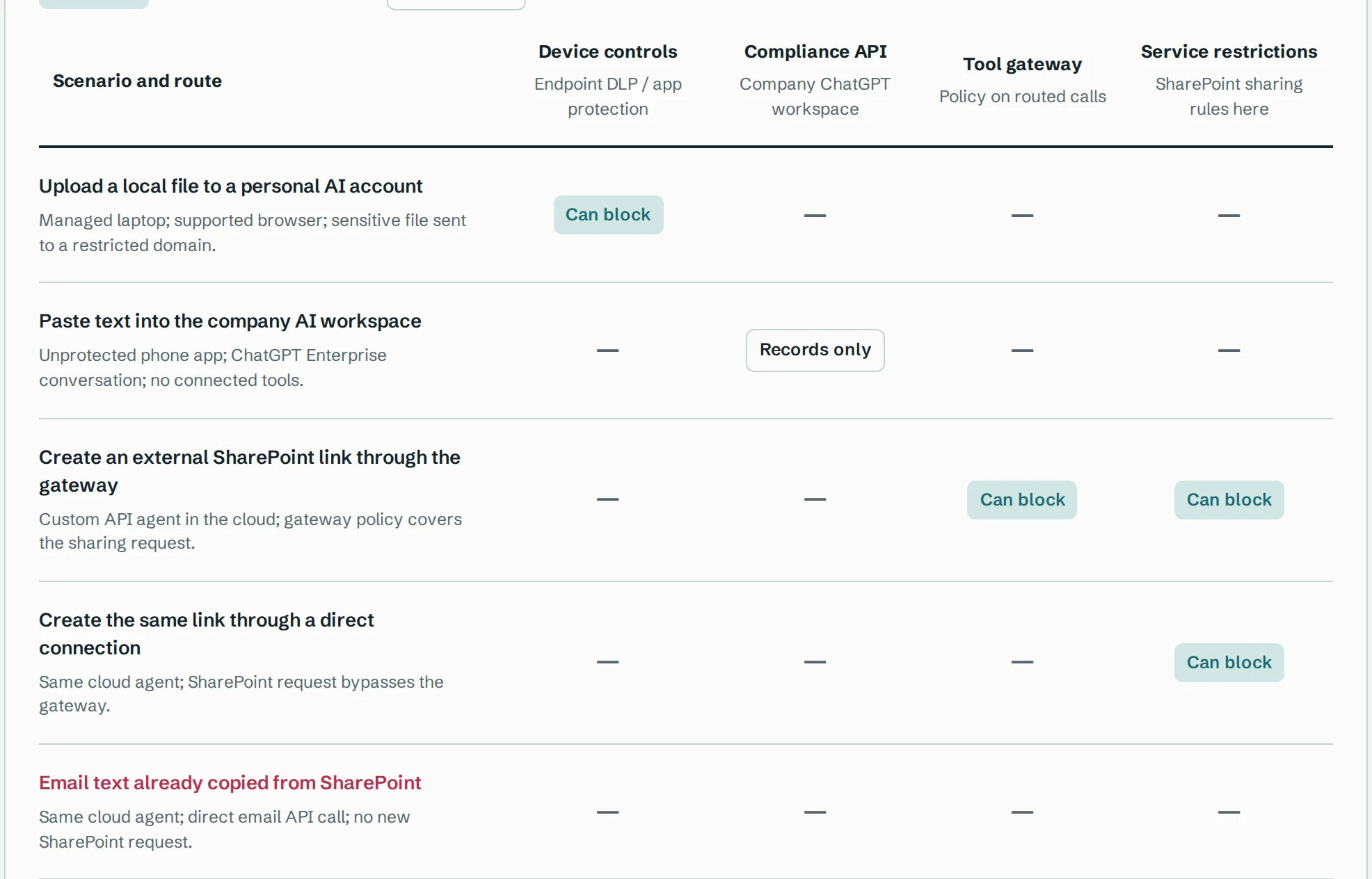
The last row needs a control on the email path. SharePoint's sharing rules can't stop text that has already been copied into an email. Email-service restrictions, runtime checks, or approval may help; they're outside this comparison.
A few assumptions behind the cells:
- The laptop example assumes a supported file and browser, an onboarded device, and an endpoint DLP rule for uploads to the restricted domain. It doesn't assume DLP can distinguish personal and company accounts on the same domain.
- The phone example assumes no device or app protection. The workspace compliance integration can record the submitted prompt, which is not evidence of a downstream service action.
- The cloud examples use a custom API-based agent outside the company ChatGPT workspace. The gateway example assumes a policy that can reject this request. Check the product's policy granularity rather than assuming it understands every tool argument.
- The SharePoint column covers external-sharing rules, with external sharing disabled at the relevant site or organization. It doesn't represent every Microsoft 365 security control.
- "Can block" describes a supported prevention point, not a guarantee that your deployment is configured correctly. Test the route, policy, and available evidence in your environment.
The two sharing-link rows show why service restrictions still matter when a gateway is bypassed. The email row shows their limit: the data has moved to another service, so the control must cover that route too.
For any control, ask where it sits, what passes that point, and whether it can prevent the specific action or only supply evidence. Then count the costs employees feel: enrollment, privacy, device switching, and support. Requiring a managed laptop for an administrative change may be sensible. Imposing the same rule on low-sensitivity drafting probably isn't.
4. Agents you build
This path applies when your organization builds agents that reach business systems, whether on behalf of employees or as standalone workloads.
The first rule is simple: give each agent an identity and permissions chosen for its task. The shared admin account that was convenient during development is not that identity.
The model suggests; your code decides
It helps to be precise about what is actually doing things. The language model proposes text and tool calls. The application around it, the runtime, decides what to do with those proposals: it calls tools, tracks state, and may loop back to the model with the results. Protocols like MCP (the Model Context Protocol) standardize how applications connect to tools, but they don't define your security architecture.
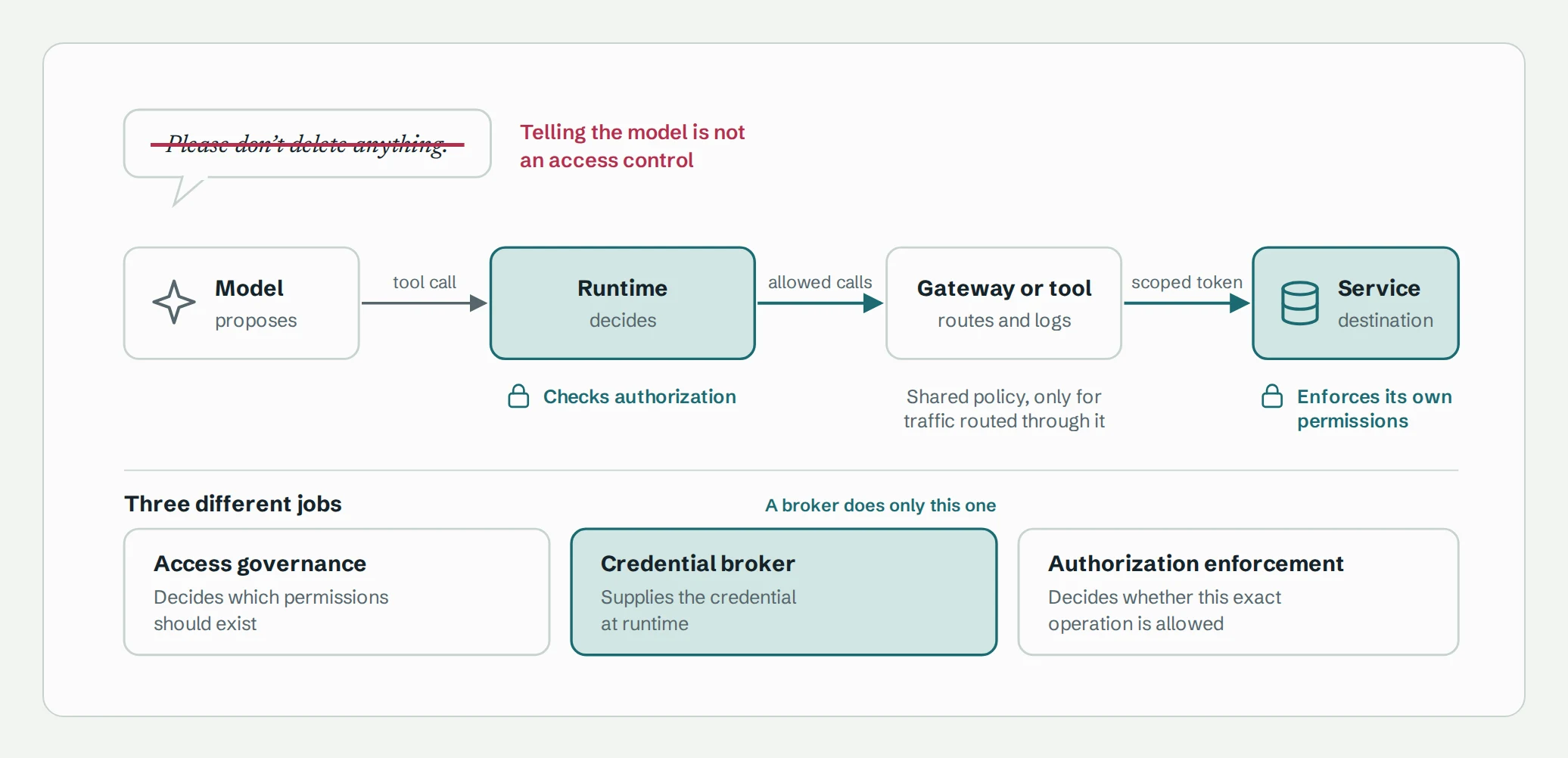
So authorization belongs in the runtime, the integration, or the destination service. Telling the model not to do something is not an access control.
Give agents less than their users have
When an agent acts for an employee, use the provider's delegation mechanism with the smallest set of application permissions that works. Under Microsoft Graph's delegated model, the app is limited by both its own granted permissions and the signed-in user's access; app-only permissions follow different rules and can reach further.
An agent doesn't need everything its user can do. A summarizer needs to read records even if the employee can also edit and delete them.
For agents that run unattended, choose a workload identity, a named owner, and a permission scope on purpose. Don't quietly reuse a developer's credential.
Keep three jobs separate
Credential brokers acquire, store, refresh, and hand out credentials at runtime. Vercel Connect is one example; what it can do depends on the connector and provider, and it doesn't guarantee fine-grained authorization across every integration. As the diagram above shows, it helps to keep three jobs distinct:
- Access governance decides which permissions should exist.
- Credential brokering supplies the credential.
- Authorization enforcement decides whether this specific operation is allowed.
A broker does the second job. Don't assume it does the other two.
A few more basics: keep secrets out of the model's context entirely, authenticate each connection between application, gateway, tool server, and destination, and make sure each tool server accepts only tokens issued to it, rather than passing a client's token straight through to the next service. MCP's security guidance calls this "token passthrough" and forbids it.
Use gateways where they save work, and know where they stop
A tool or MCP gateway can centralize authentication, policy, quotas, routing, and logging for the applications that use it; Azure API Management offers these controls for MCP endpoints, for example. A model gateway sits at a different point, between your applications and the models, where it can authorize access, balance load, apply content-safety policies, and enforce token quotas. Some products do both: Azure's AI gateway covers models and MCP servers.
Remember two limits. Gateways don't automatically understand every tool argument or business rule, so check how fine-grained their policies really are. In Azure API Management, for instance, policies currently apply to every tool an MCP server exposes rather than to individual tools. And they only cover traffic that flows through them. An agent's local tools and direct API calls stay outside unless they're routed in.
Weigh a gateway honestly. Does it remove duplicated work across teams, or does it become an onboarding bottleneck? Decide in advance what happens when it goes down. Before launch, test that delegated restrictions hold and that consequential actions can't bypass enforcement.
5. Agents that act alone
This path applies when an agent can make meaningful changes without a person checking each step. The question shifts from "what can it access?" to "what could go wrong, given that access?"
Write down the agent's authority
Spell out what the agent may do, on which resources, within what limits, and when a human must step in:
The project agent may read assigned projects and draft updates. It may publish to designated internal channels after approval. It may not change project membership or send information externally.
Some actions can run under a standing mandate without per-action approval. That's fine, as long as the mandate is written down rather than implied by the absence of an approval prompt.
Where approval is required, tie it to the specifics: the destination, the content, the resources, and any material changes. Approval should never grant permissions the agent doesn't otherwise have, and authorization should be checked again at the moment the action runs.
Ask the question that sizes the risk
The single most useful question in this roadmap is this:
If the model followed a malicious instruction, what harm could it still do?
Prompt injection means that external content, such as a web page, an email, or a document, can steer the model as if it were an instruction. You can't reliably filter it out. The NCSC recommends leaning on deterministic limits on what the system can do rather than relying mainly on blocking malicious content. So instead of asking whether an attack is possible, ask what one could achieve. The NCSC's framing is blunt: once a model can call tools, assume the impact is whatever an attacker could do with direct access to those tools. Consider two assistants.
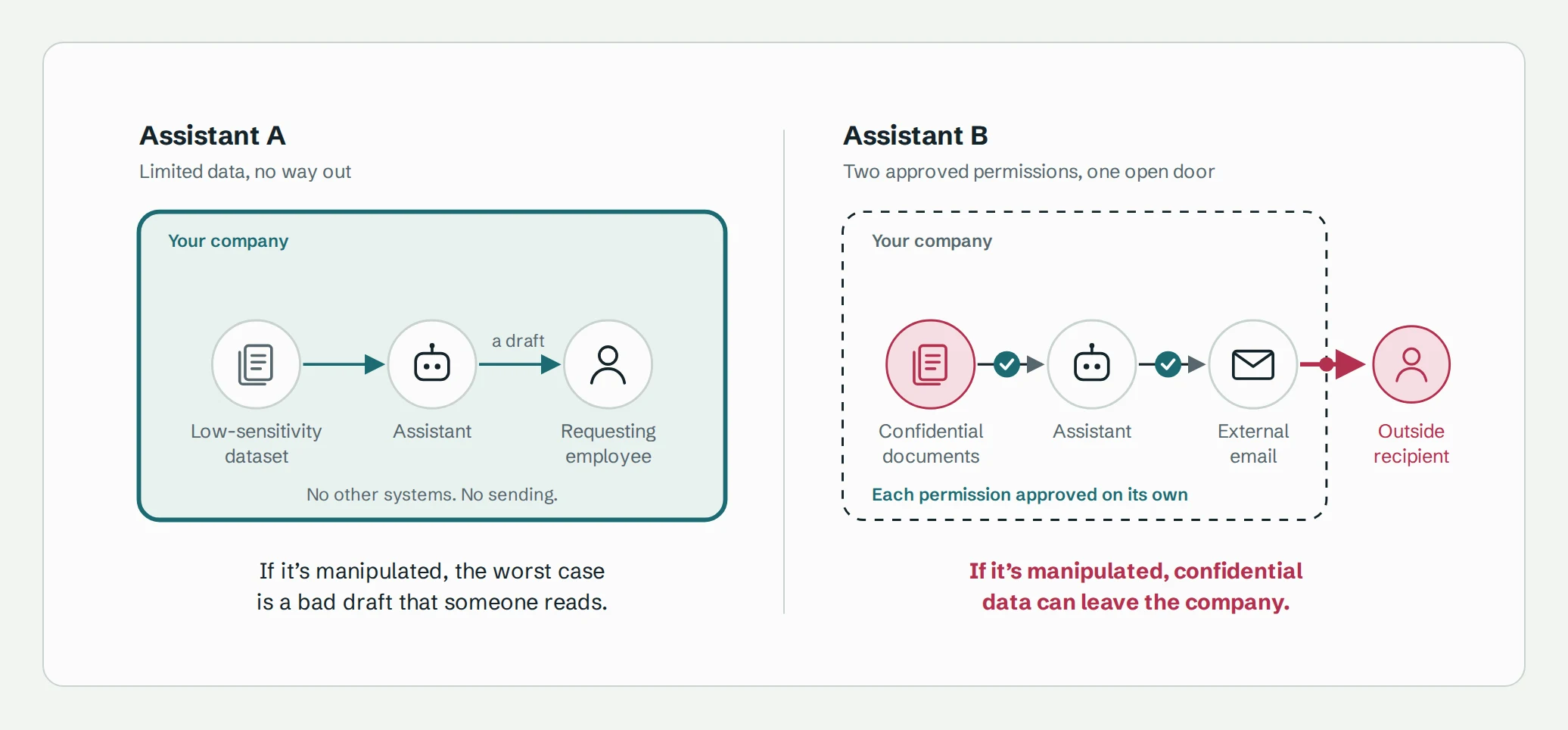
The first assistant reads a limited, low-sensitivity dataset and hands a draft back to the employee who asked. It can't reach other systems or send messages. Even if it's manipulated, the damage is contained, and it may need little beyond its existing restrictions and a person reading the output.
The second reads confidential documents and can send external email. Each permission may be legitimate on its own, but together they open a path for data to leave the company. That specific risk needs a specific answer: which destinations does it really need, which data does it really need, and should it ever send without a person approving?
This framing also means many findings resolve cheaply. OWASP traces "excessive agency" to excessive functionality, permissions, and autonomy, and its recommended fixes include narrower tools, minimal privileges, running in the user's context, and authorization outside the model. Try those before buying something new. OWASP's own worked example looks a lot like Assistant B: an email summarizer whose plugin could also send messages, turned by a malicious incoming email into a way to send mail on the attacker's behalf.
Add safeguards for what's left
Once access is tight, match any remaining risk to a targeted safeguard:
- The agent must read untrusted content while making consequential decisions. Consider separating trusted instructions from external material, testing manipulation resistance, and independent checks or human review.
- Necessary read and send permissions together allow disclosure. Consider restricting destinations, reducing the data available, or disclosure controls on that path.
- Generated code or commands will execute. Consider treating model output as untrusted input and validating it, narrow tools instead of open-ended ones like a raw shell, and isolated execution.
- Repeated legitimate actions could cause damage or runaway costs. Consider limits on transaction size, action count, duration, spending, and retries, plus a way to stop and escalate.
Check what your runtime already provides. Claude Code, for example, can sandbox shell commands with operating-system-level filesystem and network isolation, a separate mechanism from the permission prompts and rules that govern its tools. Know which one actually enforces what.
Two final cautions. First, read-only doesn't mean harmless. An agent that informs an important decision can be manipulated into a bad recommendation. The NCSC's example is a CV-screening system where hidden text in a CV tells the model to approve the candidate. No access control catches that, so test the agent's integrity and keep review in the loop from the start. Second, when you test safeguards, measure whether legitimate work still gets done, not just whether attacks get caught. And give reviewers enough context to make a real decision, or approval becomes a rubber stamp.
6. Know what happened, and what you can't see
Three kinds of records answer three different questions. Access records show what an identity can do. Execution records show what an application tried to do. Provider logs help confirm what actually happened.
For consequential actions, capture the whole chain, and record each outcome as what it really was.
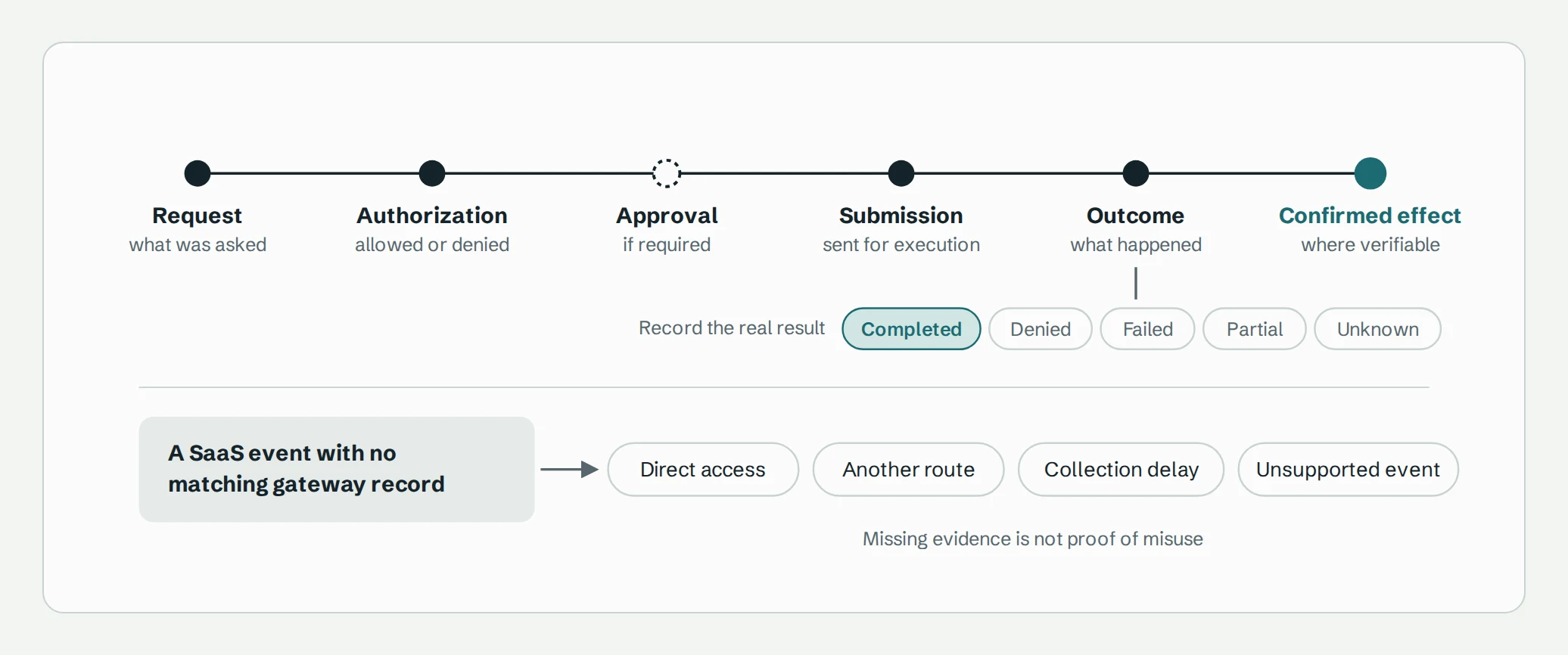
Correlate records across the runtime, gateway, integration, and provider. Shared identifiers make far stronger matches than timestamps; Azure's MCP monitoring guidance, for instance, recommends correlation IDs in request headers for tracing across systems.
Keep denied and failed tool calls, too. The NCSC points out that attackers usually have to refine a prompt injection, so a run of failed calls can reveal an attack in its early stages.
Be careful with gaps. Activity can happen outside any route you manage, so collect provider evidence independently, and know its limits. Slack's Audit Logs API, for example, is available on Enterprise Grid, is read-only, covers a defined set of event types, and can't retrieve message or file content.
That's why an action in a SaaS log with no matching gateway record doesn't prove anything was malicious or AI-driven. Track connector health and log freshness so that "we couldn't see" never looks like "nothing happened."
Give remediation its own rules
Suppose a service account suddenly holds elevated permissions and there's no matching request on record. That justifies investigation, and perhaps a predefined fix. It doesn't justify whatever response someone thinks of in the moment. Define in advance which resources a response may touch, what evidence it requires, what changes are allowed, how much disruption is acceptable, and when to escalate. Then verify that each change took effect.
Apply the same discipline to your own security tooling. Integrations that collect evidence and make fixes are powerful and privileged. Limit their permissions, separate the ability to observe from the ability to change, protect their credentials, and keep sensitive data out of audit logs wherever you can, so that gathering evidence doesn't create new copies of confidential information.
7. Spend deliberately
Every control costs more than its license. When comparing options, look at the whole picture:
- Security coverage: which scenarios it reduces, whether it prevents or only detects, which identities, services, devices, and routes it covers, and what gaps remain.
- Business benefit: work it enables, integration effort it saves, administration and investigation time it reduces.
- Running it: deployment, custom connectors, permission mapping, testing, upgrades, API changes, credential rotation, exceptions, on-call ownership.
- Direct cost: licenses, infrastructure, processing, log storage, and any premium provider tiers needed for the APIs.
- People: extra sign-ins, device switching, blocked features, approval delays, onboarding time.
- Complexity: overlapping or conflicting policies, duplicate alerts, new privileged integrations, outage dependencies, lock-in.
Friction adds up fast. Multiply the number of people affected by the extra time per task and by how often they do it. 200 people × 3 extra minutes × 10 times a week = 100 hours a week. That's roughly the full working week of 2.5 people, spent on friction. Validate estimates like this in a pilot, and watch for rework, support tickets, and whether people actually stick with the approved workflow.
Layers should earn their place. Overlapping controls are valuable when they cover different failures or provide independent evidence. They're waste when they duplicate findings and policy maintenance. State what each layer adds, and don't count the same risk reduction twice. Service restrictions, a gateway, and an endpoint control might all touch one workflow, yet each covers a different failure: the first holds whatever route a request takes, the second can stop a call before it runs, and the third catches local activity the other two never see.
Be honest about ROI. Use ranges and state your assumptions. Where evidence is thin, separate known costs, expected benefits, and uncertainty instead of inventing a risk-reduction percentage. And identify hard requirements first: some rule out designs entirely, and only the designs that meet them are worth comparing on cost.
8. Plan what's next, and keep revisiting
Having a capability and operating it well are different things. A company can govern purchased assistants very well without any central agent platform, while a company running autonomous agents can still have poor ownership and access hygiene. So judge maturity within a stated scope, look for tested and repeatable operation, and track coverage separately. Controlling one service doesn't mean you control them all. A tested manual process is fine for a small population; automate when it improves reliability or cost.
NIST's Cybersecurity Framework offers a practical planning method: document the outcomes you achieve today, define the outcomes you need, and prioritize the gap between them. Then sort the work by timing:
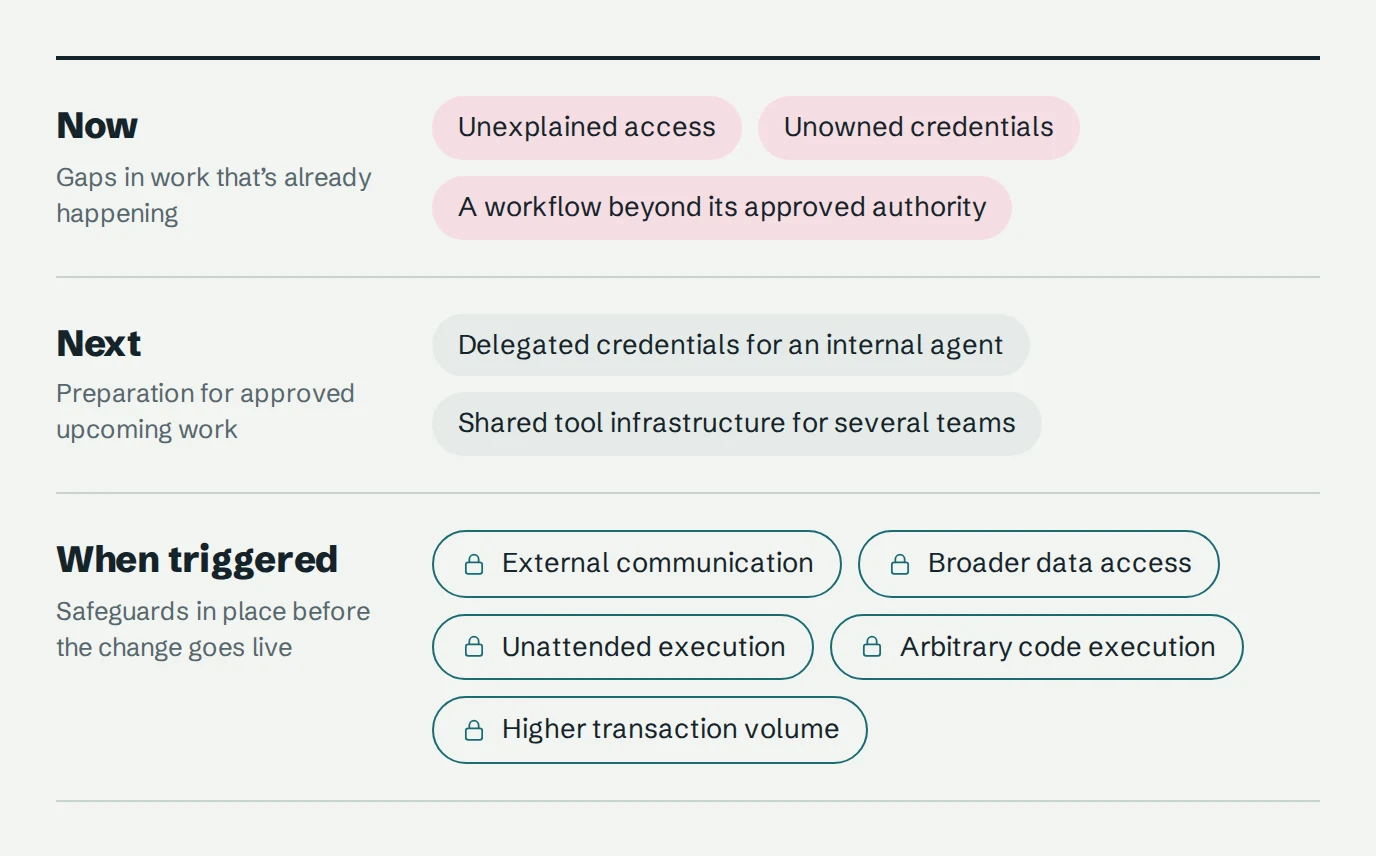
For each important workflow, keep a short decision record: purpose, owner, data access, authority, chosen controls, coverage limits, evidence that they work, operating cost, and remaining risk. Revisit it whenever the agent gains a tool, changes credentials, adds persistent memory, moves to a new environment, or receives broader authority.
And run this test regularly:
If an employee switched to a different assistant, or moved this task to their phone, which protections would still apply? Which would disappear? What would it take to restore them?
Where to start
If you do nothing else this quarter:
- Describe five real AI workflows, noting exactly where the AI moves from drafting to acting.
- Map the access behind them: which identity each one uses, what it can do, and who owns it.
- Fix the obvious problems first, like unneeded write access, unowned integrations, and shared admin credentials, and then verify the fixes.
- For any agent that acts on its own, ask what a hijacked model could still do, and aim your safeguards at that.
- Fund new controls only when they close a documented gap or enable approved work, and name who will run them.
AI tools will keep changing. The organizations that stay in control won't be the ones with the most security products. They'll be the ones that can always say what their AI can reach, and change it when they need to.
That's the problem we build YeshID to solve: effective access for every identity you have, human, machine, or agent. If you want to see what your AI integrations can actually reach, start with YeshID.